

javascript
Debounce와 Throttle.
고빈도 이벤트(scroll, resize, input)를 제어하는 Debounce, Throttle 차이와 구현.
- Debounce: 이벤트가 멈춘 뒤 한 번 실행 (검색 input)
- Throttle: 일정 간격마다 최대 한 번 실행 (scroll, resize)
⚖️ 비교
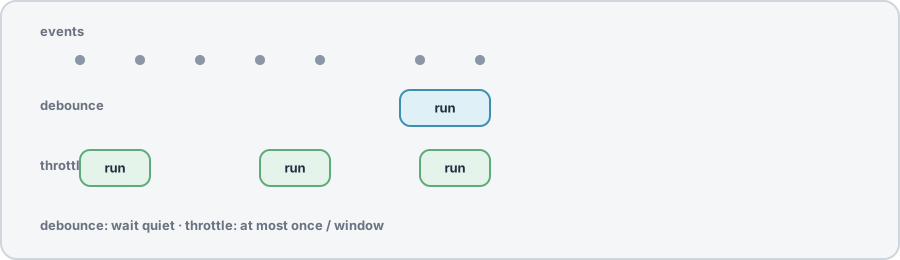
| Debounce | Throttle | |
|---|---|---|
| 실행 시점 | 마지막 호출 후 delay 경과 | delay 간격마다 |
| 연속 호출 | 이전 타이머 취소, 재예약 | 간격 내 호출 무시 또는 trailing |
| 대표 UX | 타이핑 끝나면 API 검색 | 스크롤 중 100ms마다 위치 체크 |
💻 간단 구현
function debounce(fn, delay) {
  let timer;
  return (...args) => {
    clearTimeout(timer);
    timer = setTimeout(() => fn(...args), delay);
  };
}

function throttle(fn, delay) {
  let last = 0;
  return (...args) => {
    const now = Date.now();
    if (now - last >= delay) {
      last = now;
      fn(...args);
    }
  };
}
- React:
useMemo로 debounced 함수를 만들거나 lodashdebounce+ cleanup에서cancel() - leading vs trailing: 첫 호출 즉시 vs 마지막 호출 후 — UX에 맞게 선택
requestAnimationFrame은 scroll 애니메이션에 throttle 대용으로 자주 사용
🔗 참고 자료
- Window: setTimeout() (MDN) — debounce/throttle 구현의 타이머 기반으로 쓰이는 API입니다.
- Window: clearTimeout() (MDN) — debounce에서 이전 타이머를 취소할 때 사용합니다.
- Window: requestAnimationFrame() (MDN) — 스크롤, 애니메이션 구간의 프레임 단위 throttle 대안으로 쓰이입니다.
- EventTarget: addEventListener() (MDN) — 고빈도 이벤트에 핸들러를 붙일 때 함께 고려하는 API입니다.